
The Video Vector Scene File
Video Vector builds its 3D world and deterministic video output via a single text file (.txt). Within it, you define the video properties, the camera and the collection of objects, as well as globally and locally defined functions and definitions. The file format is designed to be very concise, easy to type and easy for the parser to process. As such it is also extremely cryptic with many aspects being defined by just a single character. This is a full document of the scene file format and conventions, so you can build a full Video Vector video.
Scene Basics
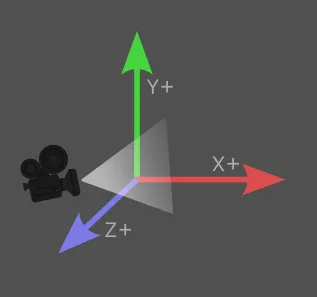
3D Space of Video Vector
3D Space of Video Vector
Video Vector uses a 3D space where X and Y axis will be familiar with anyone who graphed objects in math class, the positive X-axis increasing off to the right of the computer screen, with the positive Y-axis increasing off to the top of the computer screen. These form the basic 2D flat plane of your computer screen.
The Z-axis, or depth, is literally that... depth into and out of the computer screen. The positive Z-axis comes out towards you, while the negative Z-axis goes in the screen.
For the video camera, you define its position, where it is looking at, and how much it sees. Start by placing the camera back along the positive Z-axis, looking back at world origin of 0,0,0 and give it a field of view of 60 degrees. Then 0,0,0 will be in the center of your screen and you will have some space between the camera and world origin for your objects to move around within.
Dynamic Expressions
The heart and soul of Video Vector are dynamic expressions. They make up the foundation of values for everything from colors and positions to line magnitude and even vertex assignments themselves. Put simply... if it's a value... it can be an equation, a dynamic expression, that generates that value. The possibilities are a bit silly, so let's go through the basic types of values you'll be using.
- Values in X Y Z 3D Vector, such as Position X Y Z, Rotation X Y Z and Scale X Y Z. Each component X, Y or Z can each be a dynamic expression.
- Color channels, such as Red Green Blue Alpha, or Hue Saturation Lightness/Value Alpha, can each be a dynamic expression.
- Boolean values, such as Visibility, or logical operators like IF THEN conditions, can be dynamic expressions.
- Single numeric values, such as Line Width or Magnitude, can each be dynamic expressions.
- Even Vertex Indices such as a Line defined as using Vertex 0 and Vertex 1, "- 0 1", can actually each be dynamic expressions evaluating to vertex indices.
Dynamic Expressions are either a static value, such as "3", or an expression (aka equation), such as "1+2". The power comes in the fact that expressions are evaluated per video frame. This allows you to create expressions that change over time and allows you to animate the objects in your scene.
Every expression is evaluated within it's own local context, meaning it only knows about that which it is given. You can define global functions, and object local functions, which can act as read only variables or as functions that pass arguments. You can not define and store values in variables. However, I have created a number of dynamic variables, such as the current time, object item index, audio levels, etc, which you can read from that are updated per frame, allowing you to create some very powerful expressions.
1) Do not use spaces or newlines when creating an expression: 1+2
2) Wrap your expression in quotes if you need to use spaces or new lines: "1 + 2"
3) Use parentheses to specify order of operation: "1 + ((4 / 2) * 1)"
4) Video & Camera details do not use dynamic expressions
  ## line that cycles in thickness between 1 and 6, as well as a rainbow of colors
- 0 1 c hsv "360 * ntime" 100 100 w "1 + abs(5 * sin(time))"
Basic Expression Value Types
Scalar (Single) Value Expressions
Boolean (bool) Values: 1, 0, true, false
Integer (int) Values: ..., -1, 0, 1, ...
Float (float) Values: -...0.0...+
Normalized (norm) Values: 0...1
Line/Face Magnitude: m (norm)
Line Thickness: w (int)
Object Visibility: ! (bool)
Line 2 Vertex Index: - (int) (int)
Face 3 Vertex Index: > (int) (int) (int)
Keyframe Time: @ (float):
Vector 3 Value Expressions
Vector X Y Z: (float) (float) (float)
Position: _ (float) (float) (float)
Rotation: / (float) (float) (float)
Scale: | (float) (float) (float)
Vertex Position: . (float) (float) (float)
Color Value Expressions
Color Types: RGB, HSV, HSL with Alpha
rgb (norm) (norm) (norm)
rgb (0-255) (0-255) (0-255)
rgba (norm) (norm) (norm) (norm)
rgba (0-255) (0-255) (0-255) (0-255)
hsv (0-360) (0-100) (0-100)
hsva (0-360) (0-100) (0-100) (norm)
hsl (0-360) (0-100) (0-100)
hsla (0-360) (0-100) (0-100) (norm)
Line/Face Color: c (type) (channels)
Background: ~ (type) (channels)
Basic Expression Methods/Operators & Variables
Video Vector dynamic expressions are their own mini scripting language with numerous operators and methods. It is very similar to other programming languages that offer inline expressions. It is a simple language consisting of methods with stack based arguments, avoiding the complexities of object oriented libraries and things like "Math.pow(x,Math.PI)" for simply "pow(x,3.1416)".
Note: every operator also has a more verbose method, such as "x+y" also can be "add(x, y)". Under the hood the operators are just formatting sugar and everything is processed as their foundational methods.
|
Variable |
Details |
Example |
|
tbd |
tbd |
tbd |
|
tbd |
tbd |
tbd |
|
Method |
Details |
Example |
|
tbd |
tbd |
tbd |
|
tbd |
tbd |
tbd |
Basic Scene File Structure
  ## video details
% (width) (heigth) : (dur) * (fps)

  ## camera details
& _ (x) (y) (z) ^ (x) (y) (z) v (deg)

  ## background color
~ (color)

  ## global definitions
? (def) = "(global_definition)"

  ## object details
[ (object_name)
    + (parent_object_name)

  ## object local definitions
    ? (def) = "(local_definition)"

  ## object visibility
    ! (visibility)

  ## keyframes
    @ (time_sec): _ (x) (y) (z) / (x) (y) (z) | (x) (y) (z)
    @ (time_sec): _ (x) (y) (z) / (x) (y) (z) | (x) (y) (z)
    @ ...

  ## vertices
    . (x) (y) (z) #vertex index 0
    . (x) (y) (z) #vertex index 1
    . ...

  ## lines
    - (vertex_a) (vertex_b) c (color) m (magnitude) w (line_width)
    - (vertex_a) (vertex_b)
    - ...

  ## faces
    > (vertex_a) (vertex_b) (vertex_c) c (color) m (magnitude)
    > (vertex_a) (vertex_b) (vertex_c)
    > ...
]

[ (object_2_name)
   ...
]
Scene File Parts
% w h : dur * fps
- % w h Begins the VIDEO definition designator (looks like an old film projector 📽️), dimensions in pixels (integers) eg 640 480
- : dur Duration designator, duration of video in seconds (float) default is 30.0
- * fps Frames Per Second designator, frames per second (integer) default is 30. Note, number of frames is literally "dur * fps"
  ## example 640x480 video 25.0 secs long at 30 fps
% 640 480 : 25.0 * 30
& _ x y z ^ x y z v deg
- & Begins the CAMERA definition designator (looks like an old film camera 🎥)
- _ x y z Position designator, position of the camera in 3D space X Y Z (floats)
- ^ x y z Look At designator, camera look at position in 3D space X Y Z (floats)
- v deg Field of View designator, angle of the field of view of the camera (degrees)
  ## example camera looks at 0,0,0 origin from +10 on Z-axis with a 60 deg field of view
& _ 0 0 10 ^ 0 0 0 v 60
~ color
- ~ Begins the BACKGROUND COLOR definition designator. Default is a transparent background.
- color Defines the actual color of the background. You can use any of the basic color types. The color is evaluated per pixel row. This allows you to do full colored backgrounds, vertical gradients, and even colors that change over time. You do not have full per pixel control however. For more complicated backgrounds, consider using a video background.
Special Variable: nbgy
- nbgy Normalized Background Y is a special variable you can use in your background color expression. It is a normalized float value 0-1 that represents the normalized value of that background color's row position relative from drawing top (0) to bottom (1). For example, the very top will be 0% drawn, so 0.0, 25% down will be 0.25, the middle, 0.5, and the very bottom 1.0.
  ## example blue background with 50% transparency
~ rgba 0 0 1 0.5

  ## example rainbow background
~ hsv "360*nbgy" 100 100

  ## example background gradient black to blue to red
~ rgb “nbgy^2” 0 nbgy